
USCCA Concealed Carry App
The USCCAEducation
4.1996.00 Reviews
- Version
- 2.0.56
- Installs
- 500.00K
- Age Rating
- Everyone 10+
Screenshots
Our Review of USCCA Concealed Carry App
 Analysis by Appyee
I approached USCCA Concealed Carry as a practical education and reference app rather than something I would open casually. Its purpose is clear: help gun owners organize concealed-carry information, find training resources, and get quick access to support-oriented tools. That combination makes it more useful before a trip, during planning, or while building better habits than it is as a simple reference to browse once and forget.
The app comes from The USCCA and is free to download. It is listed for Everyone 10+, runs on Android 7.0 and later, and has reached over 500 thousand installs. Its current version is 2.0.32, while the project itself dates back to June 2017. That history matters because this is not a brand-new experiment; it is an established companion for people who want concealed-carry information in one place.
How the app feels in current use
The strongest part of the experience is the way it brings several related tasks together. Instead of switching between a general search engine, a training provider, and a separate state-law reference, I can begin with one app and decide what I need from there. The store summary points to reciprocity, training, and instant support, and those three ideas describe the app’s practical center better than a broad claim about being a complete gun-owner platform.
I would use the reciprocity material when preparing to cross state lines, the training area when looking for structured education, and the support tools when I need guidance quickly rather than when I have time to research. That division gives the app a sensible rhythm. It is not trying to replace every firearm resource on a phone; it is trying to make several high-priority starting points easier to reach.
That said, I would not treat any mobile reference as permission to stop thinking. Carry laws can be detailed, conditional, and subject to change. The app is most valuable as a convenient orientation tool and a prompt to verify important decisions through current official sources. Convenience is not the same thing as legal certainty, especially when a trip involves multiple jurisdictions or unusual locations.
Reciprocity is useful when planning, not when guessing
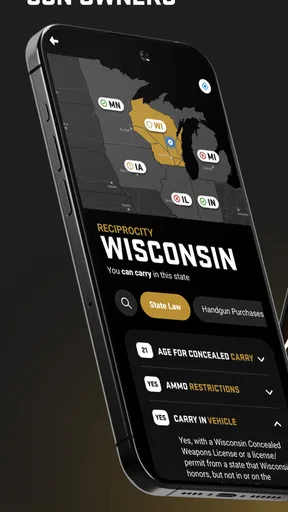
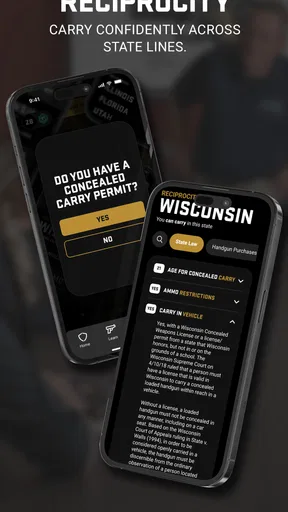
The reciprocity function is the feature I would open first before a road trip. A realistic example is someone who normally carries in one state and is driving through two others for work. Rather than relying on a remembered conversation or an old browser bookmark, that person can use the app as an initial map of the issue, identify the states that require closer attention, and then check the most important details before leaving.
The valuable workflow is not simply looking up a state and moving on. I would note the route, separate the destination from the states crossed on the way, and pay attention to the conditions attached to recognition. Reciprocity is rarely just a friendly yes-or-no question; age, permit status, prohibited places, vehicle rules, and other circumstances can change what a traveler needs to know. The app helps focus that research, but it should not encourage rushed interpretation.
This is also where the app may be better than a generic search engine for a first pass. Search results often mix old articles, opinion pieces, and pages written for a different audience. A dedicated concealed-carry app gives the question a clearer home. The trade-off is that I would still want an official state source or qualified legal guidance for a final check, particularly before carrying somewhere unfamiliar.
Training is more than a link to information
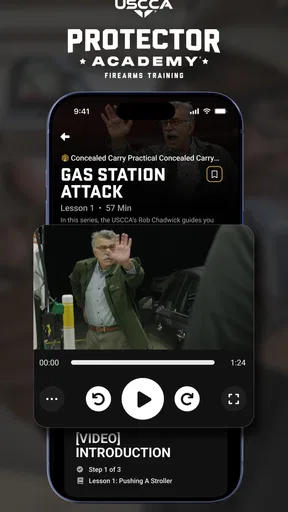
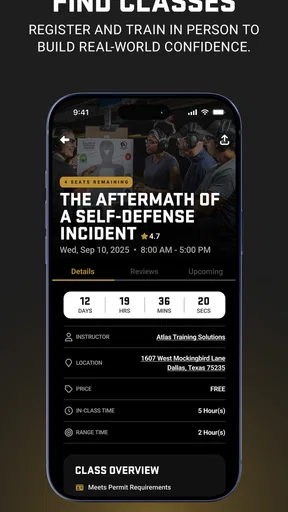
The training side gives the app educational value that a plain reciprocity chart would lack. For a new owner, the useful question is not only “Where can I carry?” but also “Am I prepared to carry responsibly?” Having training resources beside carry information makes that connection visible. It encourages a user to treat legal eligibility and practical competence as separate responsibilities.
I would use this section in stages. First, I would look for material that helps establish a foundation. Then I would return when a specific concern appears, such as safe handling, decision-making, or preparation for a concealed-carry course. The app works best as a doorway into learning rather than as a replacement for hands-on instruction. Reading on a phone cannot provide the same feedback as an instructor observing technique in person.
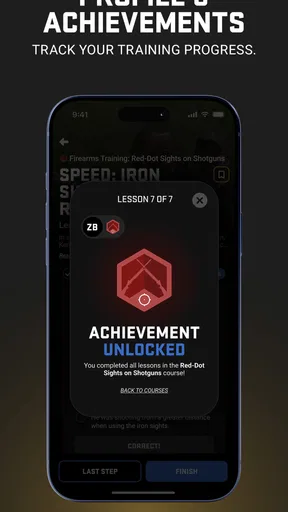
One non-obvious benefit is that the training area can help an experienced owner notice complacency. It is easy to think that familiarity equals readiness, especially when carrying has become routine. Opening a structured educational resource before a trip or after a long break can expose subjects worth revisiting. I would not measure progress by how quickly I finish material; I would use it to identify questions that deserve deliberate practice with a qualified professional.
Support tools are most useful before an emergency
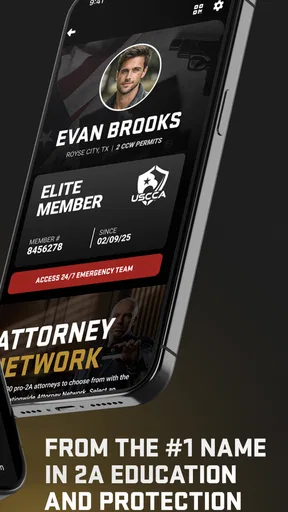
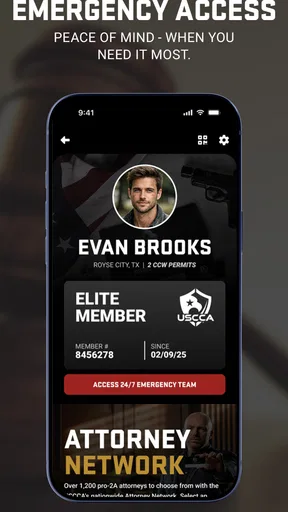
The promise of instant support sounds most attractive in a stressful moment, but the smarter approach is to become familiar with the support path while calm. I would open the relevant tools in advance, understand what kind of help they are intended to provide, and make sure I know where to find them. That small preparation step matters because searching through an unfamiliar interface during a crisis is slower than using a layout I already recognize.
This does not mean the app should replace emergency services or professional assistance. If there is an immediate threat or a medical emergency, the appropriate emergency channel remains the priority. The app’s support role is better understood as an additional resource for gun owners, not a universal substitute for police, medical personnel, attorneys, or instructors.
That distinction is important for expectations. A support button can reduce friction, but it cannot make a complicated situation simple. I appreciate the presence of this kind of tool, while keeping its limits in mind. The feature earns its place on my phone when I know what it does before I need it.
What has changed and how the current version affects users
The app’s current release is 2.0.32, which signals that the product has moved beyond its earliest form. I see that version number as evidence of an ongoing product rather than proof of any particular new feature. Without assuming that every update transformed the experience, the practical takeaway is that users are working with a maintained version of an app that has been around since June 23, 2017.
For someone installing it today, that evolution mainly affects expectations. I would expect a more mature navigation structure than a first-generation utility, but I would still judge the app by how quickly it answers the questions that matter to me. A long history is reassuring in one sense, yet it also means the app has to remain clear for both newcomers and people who have used earlier versions.
Existing users may notice the difference most in continuity. A person who already built a habit around the app does not necessarily need dramatic redesigns; dependable access to familiar information can be more valuable than constant visual change. On the other hand, anyone returning after a long absence should spend a few minutes checking the current layout and revisiting saved routines rather than assuming every path works exactly as remembered.
The rating gives a mixed but useful signal: the app averages 3.9 from around 1.8 thousand ratings, with roughly 962 written reviews. I do not read that as a reason to dismiss it or as a guarantee of smooth performance. It suggests an app that helps many people while leaving enough room for frustration, device-specific issues, or expectations that the product cannot fully meet.
That middle position matches my own view. The concept is practical, but its usefulness depends on current information, clear presentation, and the user’s willingness to verify serious matters. A person who wants a single shortcut for every concealed-carry question may find the experience less satisfying than someone who understands it as a starting point and preparation tool.
Small workflows that make the app more worthwhile
I would begin by separating three habits that are easy to blur together. Before travel, I would use reciprocity information for route planning. During an education session, I would use the training section to identify subjects for deeper study. At home, I would explore support options so they are familiar before they become relevant. Treating those as different workflows prevents the app from becoming a vague collection of buttons.
A second useful habit is to avoid checking only the destination. If I were driving across several states, I would make a short written route list and review each jurisdiction rather than assuming the destination’s rules cover the journey. The app can make the first pass faster, but the responsibility for noticing exceptions remains with me. This is a practical trade-off: the app saves research time, but it does not remove research work.
A third is to pair digital learning with a real training plan. After reading or reviewing material, I would write down one or two questions to take to an instructor. That turns passive phone use into a better conversation and helps expose gaps that an app cannot evaluate. It is especially important for new owners, who may not yet know which details they are misunderstanding.
I would also avoid opening the support section for the first time under pressure. A quick familiarization session, done when nothing is urgent, can reveal whether the wording and navigation make sense to me. This is a simple but overlooked advantage of the app: its support value depends partly on preparation by the user.
Where the app still has limits
The biggest limitation is inherent to the subject. Legal and safety information needs context, and a compact mobile presentation can make complex rules feel more definite than they are. I would be cautious about treating a short result as the entire answer. If a decision could affect travel, possession, storage, or interaction with law enforcement, I would use the app to frame the question and then seek the most authoritative current answer available.
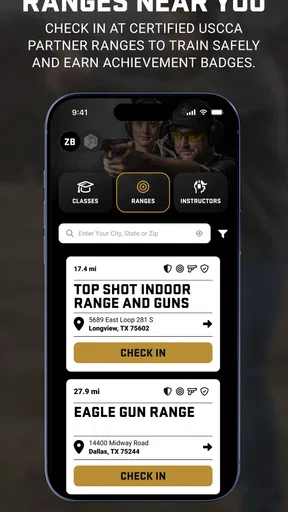
The app may also be too narrow for someone who wants a broad firearm-management suite. Its identity is centered on concealed carry, reciprocity, training, and support. If I wanted detailed equipment records, extensive range logging, or a general-purpose shooting journal, I would look for a specialized alternative instead of expecting this app to cover those jobs.
It is not the ideal choice for a person who dislikes mobile references and wants everything in a printed handbook. Nor is it a substitute for local instruction. A phone can present information at the right moment, but it cannot assess safe handling, correct a physical mistake, or understand every detail of a user’s circumstances.
There is also a mental burden that comes with putting serious information behind a convenient interface. Because the app is easy to open, a user may be tempted to make a fast decision after a quick glance. I think the responsible way to use it is slower: read the relevant material, note the conditions, verify the high-stakes points, and ask for professional help when the situation falls outside ordinary planning.
Who should install it, and who should skip it?
I would recommend it to a gun owner who travels between states, is beginning concealed-carry education, or wants related reference and support tools in one app. It is also a reasonable companion for someone who already has training but wants a more organized way to begin researching reciprocity before a trip.
New owners may appreciate the connection between legal awareness and education, provided they do not mistake reading for complete preparation. Experienced owners may value the convenience more than the lessons, especially when planning a route or refreshing their understanding after time away. In both cases, the app is strongest when it becomes part of a broader routine rather than the only source consulted.
I would skip it if I wanted a full legal opinion, a replacement for hands-on instruction, or a detailed all-purpose firearm log. I would also skip relying on it alone if my situation involved unusual legal circumstances. A state agency, qualified instructor, or attorney may be the better choice for those questions, even if the app helps me formulate what to ask.
What I would watch before making it a daily tool
My main test would be whether the current version keeps important information easy to locate and understandable without oversimplifying it. I would watch how naturally the reciprocity and training areas support repeat use, whether the support path remains easy to recognize, and whether the overall navigation feels equally approachable to a first-time owner and a returning user.
I would also pay attention to how the app fits into verification habits. The best version of this tool should encourage careful follow-up rather than create false confidence. If it helps me identify the right jurisdiction, the right training question, or the right support channel, it is doing something valuable even when I still need another source for the final decision.
For an established product with a current version of 2.0.32, continued usefulness matters more to me than novelty. I am less interested in decorative changes than in dependable access, sensible organization, and information that remains appropriate for real planning. Those are the qualities that determine whether an app like this stays installed after the first week.
My final take
USCCA Concealed Carry is a focused education and reference app that earns its place by combining concealed-carry planning, training access, and support-oriented tools. I like it most as a preparation companion: something I open before a trip, during a learning process, or while making sure I understand where to seek help. Its free price makes trying it straightforward, and its Everyone 10+ rating reflects an educational audience rather than a game-like experience.
The app is not a magic legal answer, a substitute for instruction, or a complete firearm-management system. Those limits are important, but they do not cancel its usefulness. Used carefully, it can reduce the time spent finding a starting point and help connect responsible carrying with ongoing education.
My recommendation is therefore conditional but positive. Install it if concealed-carry reciprocity, training, or quick access to owner support are relevant to your routine. Use it deliberately, verify high-stakes details, and keep professional and official sources in the loop. If you approach it that way, this app feels less like a promise to solve everything and more like what I think it does best: a practical first stop for better-informed preparation.
Privacy and Permissions
See what permissions an app requests and how it handles your data.
- Location
- approximate location (network-based), precise location (GPS and network-based)
- Photos/Media/Files
- read the contents of your USB storage, modify or delete the contents of your USB storage
- Storage
- read the contents of your USB storage, modify or delete the contents of your USB storage
- Camera
- take pictures and videos
- Microphone
- record audio
- Wi-Fi connection information
- view Wi-Fi connections
- Other
- view network connections, full network access, run at startup, draw over other apps, control vibration, prevent device from sleeping
Verdict
Strengths of USCCA Concealed Carry App
- Quick access to concealed-carry laws by state
- Interactive training resources support responsible firearm ownership
- Emergency contacts and legal assistance information are easy to find
- Clean interface makes key safety tools simple to access
- Membership features can add value for USCCA subscribers
Limitations of USCCA Concealed Carry App
- Many useful features require a paid USCCA membership
- State laws can change faster than app updates
- Some tools may be less useful outside the United States
- Requires location and personal information for certain features
- Content may feel geared toward USCCA members rather than beginners
Similar Picks in This Category
View All
Duolingo: Language Lessons
Duolingo4.7

Google Classroom
Google LLC2.8

Unacademy: Learn & Crack Exams
Unacademy3.2

Bible App for Kids
Life.Church4.4

Cake - Learn English & Korean
Cake Corp.4.7

Brainly: AI Homework Helper
Brainly4.5
Frequently Asked Questions
What is the USCCA Concealed Carry App used for?
The USCCA Concealed Carry App is designed to support responsible concealed-carry education and everyday preparedness. It may provide access to training materials, legal and reciprocity information, safety resources, membership-related tools, and other firearm education content. Its exact features can vary by account type, location, and app version, so users should review the current listing and in-app details before relying on it.
Does the USCCA Concealed Carry App replace legal advice or official firearm training?
No. The app should be treated as an educational and reference tool, not a substitute for a qualified instructor, attorney, law-enforcement agency, or official government source. Firearm laws can change frequently and may differ between states, counties, cities, and specific locations. Always verify current regulations through authoritative sources and seek professional guidance before carrying or transporting a firearm.
Can the app show concealed-carry laws for different states?
One of the app’s most useful purposes is helping users research concealed-carry regulations and reciprocity information across jurisdictions. However, this information should not be considered permanently complete or legally binding because rules, permit requirements, prohibited locations, and recognition agreements can change. Before traveling, confirm the latest requirements with the relevant state agency and understand all applicable local restrictions.
Do I need a USCCA membership to use the app?
Some features may be available to general users, while other tools, educational materials, benefits, or account functions may require a USCCA membership or an eligible subscription. Availability can also depend on your region and the current app release. Check the official app-store description and the membership terms before downloading if access to a particular feature is important to you.
Is the USCCA Concealed Carry App suitable for beginners?
The app can be helpful for beginners because it gathers safety, education, and concealed-carry information in a mobile format. Nevertheless, reading digital content alone does not provide hands-on experience or prove competency. New firearm owners should combine the app with professional instruction, safe storage practices, supervised range training, and a clear understanding of the laws that apply where they live and travel.
